Installation Guide
TallCMS can be installed in two ways: as a **standalone application** (full CMS) or as a **Filament plugin** (add to existing app).
Create Your First Page
> **What you'll learn:** How to create a page, add content blocks, and publish it live.
Publish Your First Post
> **What you'll learn:** How to create a blog post, assign categories, and publish it.
Set Up Navigation
> **What you'll learn:** How to create a navigation menu with links to your pages.
Managing Pages & Posts
> **What you'll learn:** The difference between pages and posts, and how to organize your content effectively.
Page Templates & Sidebar Widgets
> **What you'll learn:** How to use page templates for different layouts and configure sidebar widgets for enhanced navigation.
Comments
> **What you'll learn:** How to enable comments on posts, moderate submissions, and configure comment behavior.
Media Library
> **What you'll learn:** How to upload, organize, and use images and files in TallCMS.
Mega Menu Plugin
> **What you'll learn:** How to create professional mega menus with advanced features like badges, CTAs, visibility rules, and multiple header templates.
SEO Features
TallCMS includes comprehensive SEO features out of the box: XML sitemaps, robots.txt management, RSS feeds, Open Graph meta tags, Twitter Cards, and JSON-LD ...
Menu Management
TallCMS includes a flexible menu system for managing site navigation. Create menus for different locations (header, footer, sidebar, mobile) with support for...
Site Settings
Configuring your site's identity, branding, contact details, and operational settings.
Embed Code
> **What you'll learn:** How to embed analytics, tracking pixels, chat widgets, and other third-party scripts into your site without editing theme files.
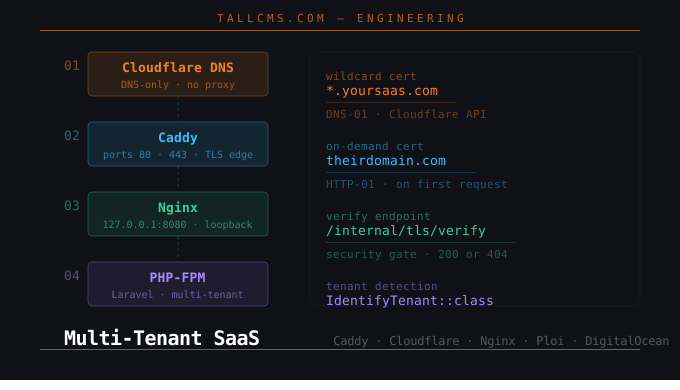
Multi-Tenant SaaS on DigitalOcean with Caddy, Cloudflare, Nginx, and Ploi
A complete, production-ready guide for Laravel developers building wildcard subdomain + custom domain SaaS products — written from a real setup session.
Multisite Setup Guide
> **What you'll learn:** How to run multiple sites from one TallCMS install — from a small in-house network of sites you own, all the way to a public self-...
Billing Plugin (Stripe via Cashier)
> **What you'll learn:** How to connect Stripe to a TallCMS multisite install via the `tallcms/billing` plugin, how Stripe products/prices map to `SitePlan` ...
CLI Commands Reference
> **What you'll learn:** All available artisan commands for managing TallCMS, plugins, themes, and content.
Publishing Workflow
Complete reference for content publishing workflow, revision history, and preview system.
Rich Editor Reference
The CMS Rich Editor is an enhanced version of Filament's `RichEditor` component, designed to make managing long structured pages with many blocks fast and di...
Pro Plugin Changelog
> **What you'll learn:** Track all changes, new features, and fixes in the TallCMS Pro Plugin across versions.
Full-Text Search
> **What you'll learn:** How to configure and use full-text search for pages and posts in both the frontend and admin panel.
Roles & Authorization
> **What you'll learn:** How TallCMS uses Filament Shield for role-based access control, including built-in roles, permissions, and artisan commands.
API Permissions Reference
> **What you'll learn:** How Shield permissions work with the REST API and how to configure roles for API access.
Multi-Tenant SaaS on DigitalOcean with Caddy, Cloudflare, Nginx, and Ploi
A complete, production-ready guide for Laravel developers building wildcard subdomain + custom domain SaaS products — written from a real setup session.
Email Marketing Integration
> **What you'll learn:** How to connect your TallCMS contact forms to Mailchimp, ConvertKit, or Brevo so leads are automatically added to your email list.